Requirements: 6.0+
Overview: Easily take notes, memos, to-do list and more just by speaking!
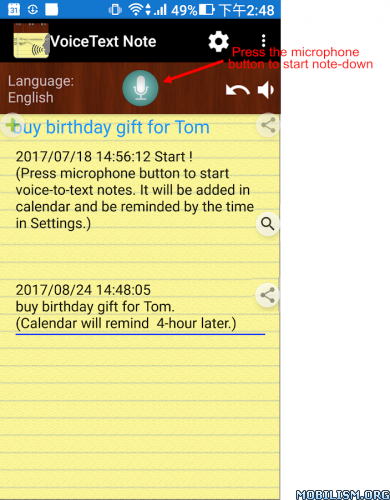
Easily keep notes & remind you.
* Just one payment, no additional monthly or subscription fees!
* After this paid version installed, please launch the new app icon with “Pro”
* Paid version premium features:
Remove Ads
Print function
Unlimited to use [Set reminder time when adding notes] and the Alarm button
Features:
– Only one touch needed.
It can keep receiving your speech and convert to text. Note down and remind you later at the date/time you set.
– Easily take notes, memos, to-do list and more just by speaking!
– Integrated with your Android calendars, you need not maintain another one.
– Also easy to share voice-to-text to friends.
– Automatically save your notes in a storage file, and easily back up to cloud.
– Support to create note files by projects or categories.
– It can work when the phone screen is turned off.
With the Recite option, you can make sure the notes are correctly recorded.
– Support headset button to control Start/Stop voice recognition.
– Supported speech recognition 120 languages.
– Supported 20 user interface languages (including English)
– Simple user interface. Just press the microphone button and speak to take note!
Requirements:
– “Google Speech Recognition & Synthesis” or “Google voice search (Google App)” is required as a speech to text engine. It’s used as a voice input or voice typing method. Most devices have it pre-installed. If your devices do not install it, This app will guide you to install.
https://play.google.com/store/apps/details?id=com.google.android.tts
https://play.google.com/store/apps/deta … ksearchbox
Permissions Notice:
This app may ask for permission to access the following features
• Microphone for speech recognition
• Calendar for adding reminder events
If you need, you can try this free version:https://play.google.com/store/apps/details?id=com.SouthernPacificOceanFisher.VoiceToText_memo
What’s New:
– Refine some UI languages strings.
– New function: Pinch two fingers to zoom the size of the note text.
– Fixed issue: When the keyboard shows up, the cursor position might be hidden under the keyboard.
– Recognition session improved: For Android 12 and above support, one session can now last many minutes without restart and beep, instead of only a few seconds.
– Fix minor issues
This app has no advertisements
More Info:
https://play.google.com/store/apps/details?id=com.SouthernPacificOceanFisher.VoiceToText_memo.pro&hl=enDownload Instructions:
https://upfiles.com/ReyohC9
Mirrors:
https://katfile.online/s1u5nzmefd3o
https://dgdrive.site/xpw0ivnpi3hp.