Requirements: 6.0+
Overview: You want to learn a foreign language, or study a specific topic, and you are looking for an application to help you organize and study your vocabulary lists?
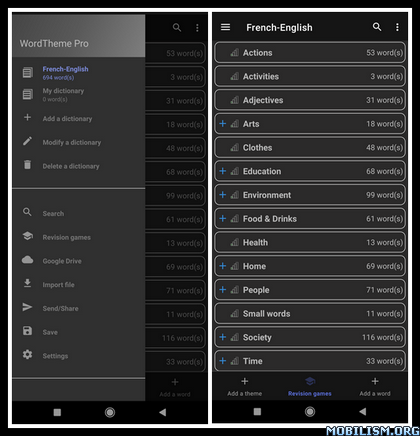
This application allows you to:
– add / modify words or sentences with their translation
– listen to the pronunciation of those words
– add those words/sentences to vocabulary lists
– arrange your vocabulary lists in themes/categories
– create a hierarchy of themes/categories (a theme can have sub-themes)
– sort the words inside a theme/category
– move a group of words to another theme/category
– create several dictionaries
– search a word in your personal dictionary
– know the level of memorization of the words added in the dictionary
– associate an image to a word
– associate various texts to the added words (definition, conjugation, declensions, examples, etc.)
You can also use this application as a lexicon or glossary, on the theme you want (mathematics, physics, chemistry, biology, cooking, psychology, philosophy, justice, etc.). This application is also very useful if you want to create a constructed language (or conlang).
To facilitate the sharing between devices or between individuals, WordTheme allows the dictionaries to be saved, imported and synchronized via Google Drive. So now you can share a common dictionary with friends, colleagues, or students.
To help you learn and memorize the words of your dictionary, “My personal dictionary” contains several games:
– Flashcards
– Find the translation: you’ll have to find the right translation amongst a list of possible answers
– Find the word: same thing, but the other way around
– Find translation (with sound)
– Mixed Letters: you must place the letters of the word in the correct order
– Spelling test: as its name suggests, you must write the word you hear while respecting the spelling
– Crossword: a crossword game is generated with the words of your personal dictionary.
All the games can be used with languages written from right to left (Arabic, Persian, Hebrew, …)
Additionally, this application allows you to:
– save your personal dictionary
– export your personal dictionary to share it with a friend, or to make a distant backup of it
– import a new dictionary or a list of words into a dictionary (with the interface inside the application or directly by sending the file to the application)
– export or save your list of words in an Excel file
A dark mode is available to limit visual fatigue while using the application.
Note: at the first launch of the application, a dictionary will be created by default with the name “My dictionary”. It is of course possible to change this name later on.
What’s new:
– Adds option to change the display position of the validation buttons on Flashcards (to avoid some problems with the device naviagtion buttons)
Paid Info:
● Supported Languages: af, am, ar, as, az, be, bg, bn, bs, ca, cs, da, de, el, en-AU, en-CA, en-GB, en-IN, en-XC, es, es-419, es-US, et, eu, fa, fi, fr, fr-CA, gl, gu, hi, hr, hu, hy, in, is, it, iw, ja, ka, kk, km, kn, ko, ky, lo, lt, lv, mk, ml, mn, mr, ms, my, nb, ne, nl, or, pa, pl, pt, pt-BR, pt-PT, ro, ru, si, sk, sl, sq, sr, sr-Latn, sv, sw, ta, te, th, tl, tr, uk, ur, uz, vi, zh-CN, zh-HK, zh-TW, zu;
● Supported Cpu Architecture: Armeabi-v7a, Arm64-v8a, X86, X86_64;
● Supported Screen Dpi: Ldpi, Mdpi, Tvdpi, Hdpi, Xhdpi, Xxhdpi, Xxxhdpi.
● Untouch Paid Apk With Original Hash Signature.
● Certificate MD5 Digest: dfbfcbee6664ac1df64d624adede63a9.
.Apks Bundle Installation:
SAI Instructions: [No Root]
1. Download And Install Latest SAI App (Split APK Installer) – https://github.com/Aefyr/SAI/releases
2. Download this .apks Archive App;
3. Install And Open SAI / Choose “Install APKs” Button / Find And Select Downloaded .apks Archive App;
4. Wait For Install And Done. Enjoy!.
Lucky Patcher Instructions: [No Root]
1. Download And Install Latest Lucky Patcher App;
2. Install And Open Lucky Patcher And Choose ‘Rebuild & Install’;
3. Find And Select Downloaded This .apks Archive App;
4. Wait For Install And Done. Enjoy!.
PS: Make Sure After Open SAI or Lucky Patcher You Allowed Storage Permission And Install Unknown Apps Permission!
This app has no advertisements
More Info:
https://play.google.com/store/apps/details?id=fr.jmmoriceau.wordthemeProVersionDownload Instructions:
https://mega4upload.net/7huo98les74c
Mirrors:
https://upfiles.com/n2ZGLT
https://uploady.io/r03o1d05lhfh
https://devuploads.com/ac6k2u14vow3